When choosing a gaming laptop, you want to make sure it has the right features to keep up with your gaming needs. Here's a breakdown of the essentials that will make your gaming experience smooth and enjoyable.
Powerful Processor: Look for a laptop with a strong CPU, like Intel’s Core i7 or AMD’s Ryzen 7. A good processor means faster performance and the ability to handle demanding games without lag. You'll thank yourself when those intense boss battles don’t cause your system to stutter!
Dedicated Graphics Card: The GPU is crucial for gaming. A dedicated graphics card, like NVIDIA GeForce or AMD Radeon, will bring your games to life with stunning visuals. Integrated graphics might be okay for casual games, but if you're serious about gaming, this is a must-have.
Ample RAM: Aim for at least 16GB of RAM. This helps manage multitasking and ensures games run seamlessly without hiccups. More RAM means less waiting and more gaming, which is exactly what you want.
High Refresh Rate Display: Look for a laptop with a display that has a refresh rate of at least 120Hz. This provides smoother visuals, especially in fast-paced games. Say goodbye to motion blur and hello to crisp action!
Top Picks for Every Budget
Under $800
If you're on a budget, check out the Acer Aspire 7. It offers great performance for the price, thanks to its AMD Ryzen 5 processor and GTX 1650 graphics. You can enjoy most games at decent settings, and it’s even got a sleek design. Perfect for gamers who also need a reliable laptop for everyday use!
Between $800 and $1200
This price range opens up even more options. The ASUS TUF Gaming A15 is a fantastic choice. With a powerful AMD Ryzen CPU and NVIDIA GeForce GTX 1660 Ti, it handles modern games like a champ. Plus, the battery life isn't too shabby, so you can game on the go without constantly searching for an outlet.
Above $1200
If you’re ready to invest a bit more, the Razer Blade 15 is an absolute beast. It features top-tier specs with options for powerful RTX graphics and a stunning display. The design is sleek and classy, making it easy to take to gaming events or work meetings. If you want to future-proof your gaming experience, this one’s a no-brainer.
Choosing a gaming laptop can feel like a big decision, but narrowing down your options based on your budget makes it easier. Whether you're a casual gamer or looking to dive deep into high-end gaming, there’s a perfect laptop waiting for you!
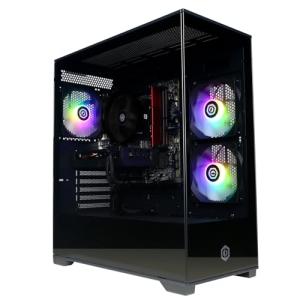
CyberPowerPC Wyvern Gaming PC - AMD Ryzen 7 5700X, Nvidia RTX 5060 8GB, 16GB RAM, 1TB NVMe SSD, 650W 80+ PSU, Wi-Fi, Windows 11, Prism Panoramic RGB Black
Product information
$1,178.06
Product Review Score
4.48 out of 5 stars
71 reviewsProduct links
How to Boost Gaming Performance
When you're choosing a gaming laptop, boosting performance should be high on your list of priorities. A few simple tweaks can make a big difference in how smoothly your games run. Let’s dive into some easy ways to supercharge your gaming experience!
First off, keep your laptop clean. Dust and dirt can mess with your cooling system, causing your laptop to overheat and slow down. Make it a habit to regularly clean the vents and keyboard. A can of compressed air can be your best friend here.
Next, manage your background processes. Before jumping into a game, close any unnecessary apps running in the background. Programs like web browsers or music players can use up valuable resources. Freeing up this memory can help your games run a lot smoother.
Don’t overlook your graphics settings! Lowering the graphics settings in your games can significantly improve performance. If your laptop struggles with high settings, dial it back a bit. You might miss some fancy visuals, but smooth gameplay is worth it.
Finally, consider upgrading your hardware. Many gaming laptops allow you to swap out RAM or SSDs. Adding more RAM can be a game-changer if you find your laptop lagging often. Just make sure to check compatibility before you buy. These upgrades can greatly enhance your gaming experience and help you get the most out of choosing a gaming laptop.
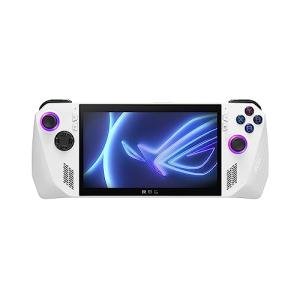
ASUS ROG Ally 7" 120Hz Gaming Handheld - AMD Z1 Extreme Processor - 512GB - White - PRE ORDER! (Renewed)
Product information
$549.99
Product Review Score
4.97 out of 5 stars
111 reviewsProduct links
Tips for Keeping Your Laptop Cool
Keeping your gaming laptop cool is essential for performance and longevity. When you’re choosing a gaming laptop, you'll want to think about how to manage heat. Here are some easy tips to help you keep things chill.
First off, try using a cooling pad. These handy devices sit under your laptop and provide extra airflow. They’re super affordable and can make a noticeable difference in temperature—especially during those intense gaming sessions.
Make sure you’re aware of the surfaces you’re using your laptop on. Avoid placing it on soft surfaces like blankets or beds that can block vents. Hard, flat surfaces like desks or tables let your laptop breathe, which helps keep it cool.
Regularly check and clean the vents. Dust can accumulate and block airflow, causing your laptop to overheat. A quick clean with compressed air can help keep those vents clear and let your machine function efficiently.
Lastly, keep an eye on the settings. Many laptops have power management features that allow you to adjust performance levels. Lowering some settings during less demanding games can help your laptop run cooler.